Website Visitors vs Leads: Why More Traffic Doesn't Always Mean More Customers
Learn why website traffic doesn't always generate leads, discover common conversion problems, and find practical ways to turn visitors into potential customers.

Quantalog
12 min read
Getting more visitors to your website feels like progress. Your SEO rankings may be improving, your marketing campaigns may be reaching more people, and your analytics dashboard may show an increase in sessions every month.
But there is one important question: Are those visitors actually becoming potential customers?
For many businesses, the answer is disappointing. Website traffic increases, but enquiries remain low. Contact forms receive very few submissions, demo bookings stay flat, and sales opportunities fail to grow at the same pace as visitor numbers.
The problem is that website traffic and lead generation measure two different things.
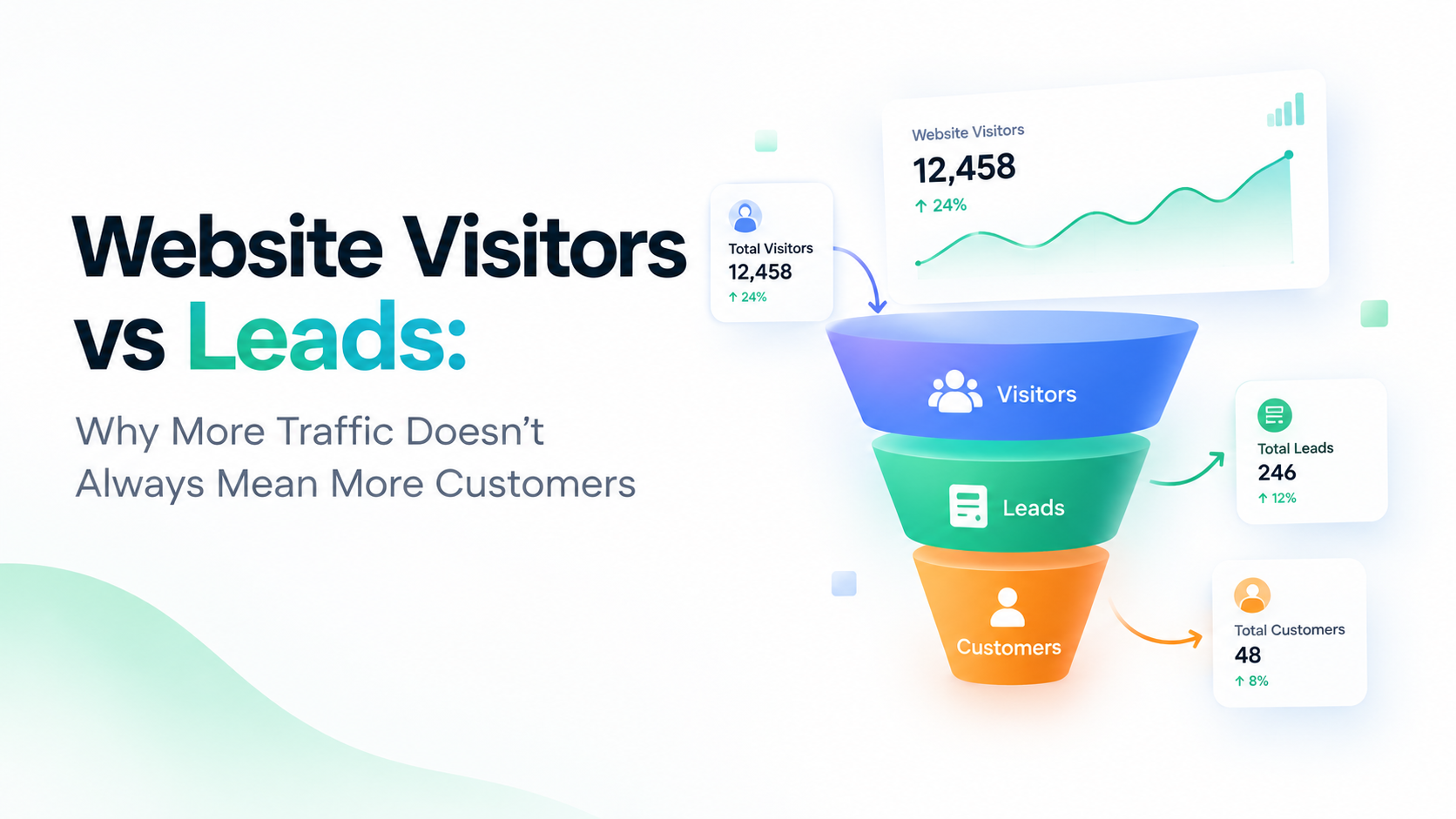
Traffic tells you how many people visit your website. Leads tell you how many people take an action that could lead to a business relationship.
Understanding the difference between website visitors and leads is the first step toward building a website that does more than attract attention.
What Is the Difference Between Website Visitors and Leads?
Website visitors are people who arrive at your website through search engines, social media, paid advertisements, referral links, email campaigns, or direct visits.
A lead is someone who expresses interest in your product or service by taking an identifiable action, such as submitting a contact form, requesting a demo, booking a consultation, or asking for more information.
Not every visitor becomes a lead, and not every lead becomes a customer.
Consider a simple example.
Imagine your website receives 10,000 visitors in one month. If only 100 visitors submit a form or request a consultation, you have generated 100 leads from that traffic.
Your website may be attracting thousands of people, but the real business opportunity depends on what those people do after arriving.
That is why successful marketing teams look beyond traffic numbers and examine the complete journey from the first visit to the final conversion.
Why More Website Traffic Doesn't Always Generate More Leads
There are several reasons a website can attract visitors without generating meaningful business enquiries.
1. You're Attracting the Wrong Audience
One of the most common reasons for low lead generation is a mismatch between your audience and your offering.
Your website might rank for popular keywords or receive clicks from social media campaigns, but those visitors may not be interested in purchasing your product or service.
For example, a company selling premium project management software might attract visitors searching for free project management templates. Although those visitors are relevant to the broader topic, many may not be interested in buying software.
How to improve it:
Review which search queries and campaigns bring visitors to your website.
Compare traffic sources with lead submissions.
Identify pages that attract visitors who are more likely to become customers.
Create content that addresses your target audience's actual problems and buying decisions.
The goal isn't simply to attract more visitors. It's to attract people who have a genuine reason to consider your solution.
2. Your Landing Pages Don't Match Visitor Expectations
Imagine someone clicks an advertisement promising a free consultation but arrives on a generic homepage with no obvious way to book one.
The visitor has to search for the relevant information, navigate through unrelated sections, and figure out what to do next.
Many people will leave instead.
A landing page should continue the conversation that started in the search result, advertisement, or referral link. If the message changes or the promised information is difficult to find, visitors may lose interest.
How to improve it:
Match landing page headlines to the message that attracted the visitor.
Explain your product's benefits clearly.
Use a prominent call to action.
Remove unnecessary distractions.
Make the next step obvious.
Every important landing page should have a clear purpose and a logical next action.
3. Your Website Doesn't Build Enough Trust
Visitors may understand what your business offers but still hesitate to contact you.
This often happens when a website doesn't provide enough information to help people feel confident about taking the next step.
Potential customers may want to understand your experience, evaluate your product, read customer reviews, compare alternatives, or learn how your service works before sharing their details.
How to improve it:
Display genuine testimonials and customer feedback where appropriate.
Explain your product or service in straightforward language.
Provide clear contact information.
Show relevant case studies or examples of your work.
Explain what happens after someone submits a form or books a meeting.
Trust is especially important when visitors are considering an expensive service, a business partnership, or a product they haven't used before.
4. Your Forms Create Too Much Friction
A visitor may be interested in your service but abandon the process because your contact form asks for too much information.
Requesting a name, email address, phone number, company name, job title, company size, budget, location, and several additional details can discourage people who are not yet ready to share that much information.
Forms can also fail because of validation errors, confusing field labels, poor mobile layouts, or technical issues.
How to improve it:
Ask only for information you genuinely need at the current stage.
Make field labels and validation messages clear.
Test your forms on mobile and desktop devices.
Check that submissions are successfully recorded.
Measure where visitors abandon multi-step forms.
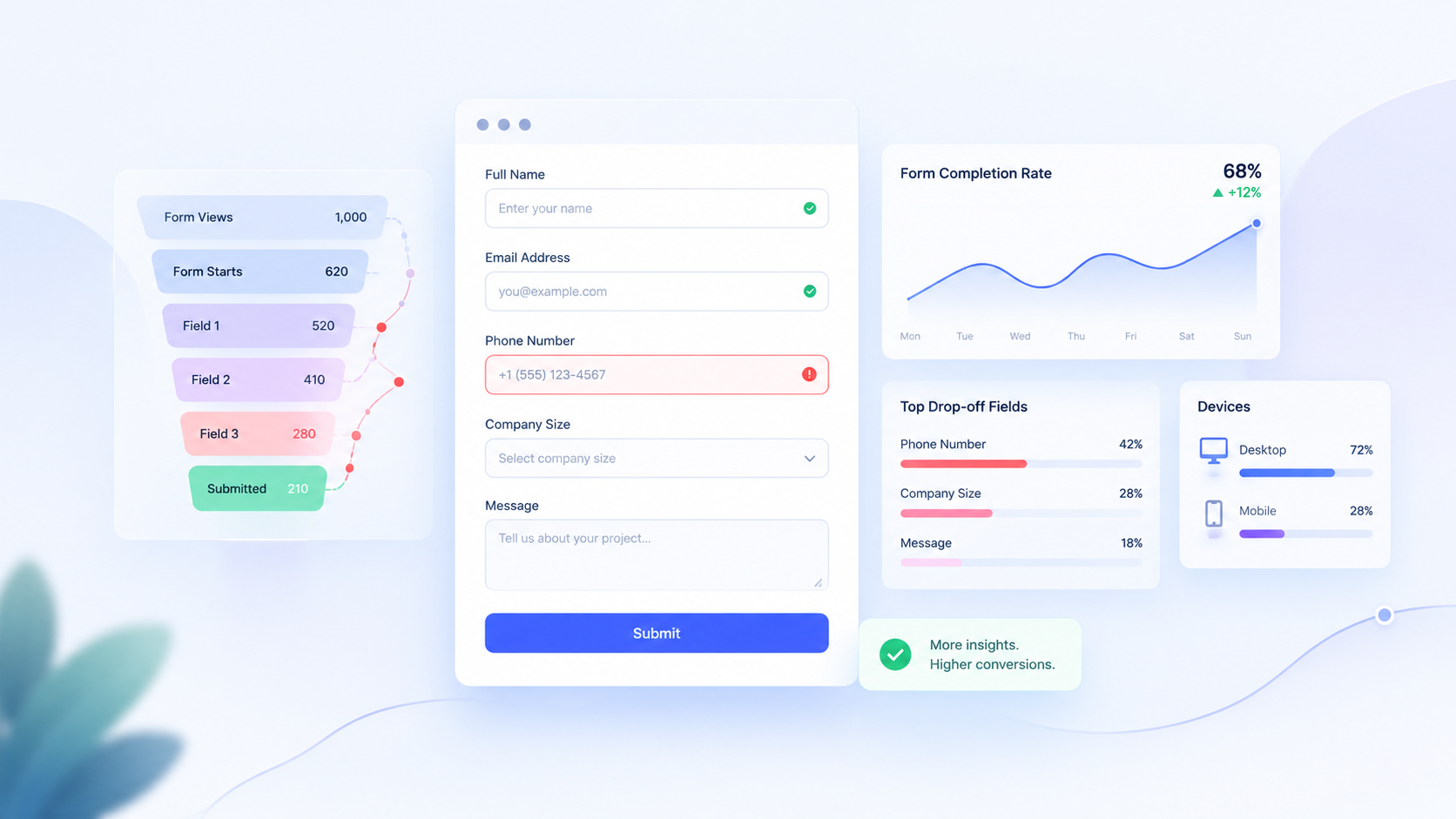
Form analytics can help you identify where users drop off, making it easier to improve the experience instead of guessing what went wrong.
5. Your Call to Action Is Unclear
Visitors need to know what to do next.
If your website contains several competing buttons, vague messages, or no obvious next step, people may consume your content and leave without taking action.
For example, a service business might use a generic button labelled "Learn More" when a more specific action such as "Book a Free Consultation" better communicates the intended outcome.
How to improve it:
Use clear, action-oriented button text.
Match the call to action to the visitor's level of interest.
Place important actions where visitors can find them naturally.
Avoid overwhelming users with too many competing options.
Test different messages to see which ones generate more qualified enquiries.
A visitor who is still researching may prefer a helpful guide, while someone ready to evaluate a solution may be more interested in booking a demo.
6. Your Website Is Slow or Difficult to Use
A website can lose potential leads when important pages load slowly, navigation is confusing, or forms are difficult to complete on mobile devices.
Even if your marketing successfully attracts the right audience, a frustrating experience can prevent visitors from reaching the point where they contact your business.
How to improve it:
Test your important pages on mobile and desktop.
Optimize large images and unnecessary scripts.
Make navigation simple and predictable.
Check buttons, links, and forms regularly.
Investigate browser errors and failed submissions.
Website performance isn't just a technical concern. It can affect how easily potential customers interact with your business.
The Website Metrics You Should Track Instead of Traffic Alone
Traffic is useful, but it becomes much more valuable when you connect it with actions that matter to your business.
Here are several metrics worth monitoring.
1. Visitor-to-Lead Conversion Rate
This metric shows what percentage of website visitors become leads during a defined period.
Formula:
Visitor-to-lead conversion rate = (Number of leads ÷ Number of visitors) × 100
For example, if your website receives 5,000 visitors and generates 100 leads, your visitor-to-lead conversion rate is 2%.
This helps you understand whether your website is turning incoming traffic into enquiries.
Make sure you define your measurement consistently. A user, a session, and a form submission are different things, so the calculation should specify which counts you're using.
2. Landing Page Conversion Rate
Not every page has the same purpose. A blog article may educate visitors, while a pricing page or service page may encourage them to take action.
Measuring conversion rates by landing page helps you identify which pages are contributing to lead generation and which may need improvement.
Look at the page's audience, traffic source, content, and call to action before deciding what to change.
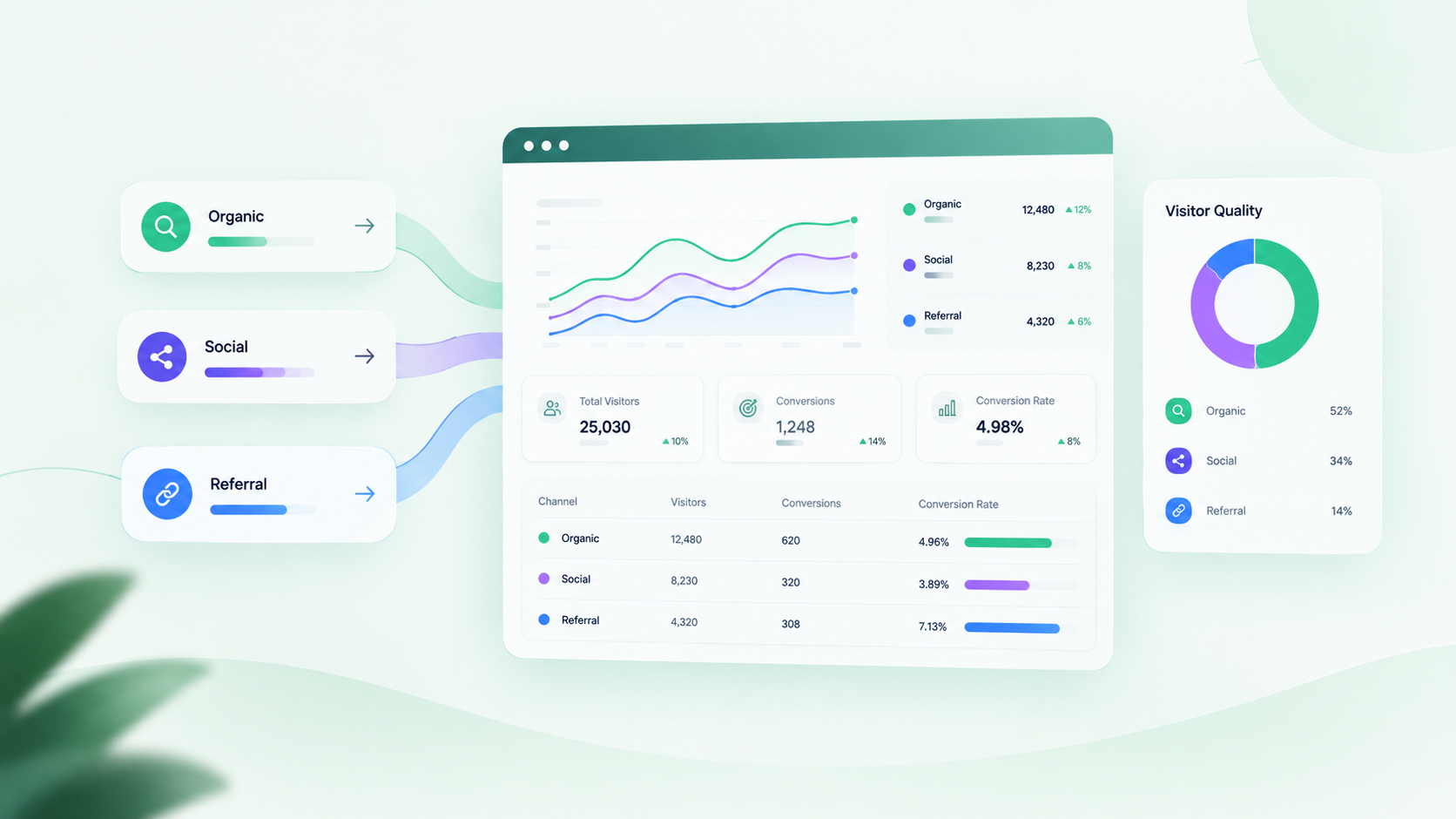
3. Lead Conversion by Traffic Source
Visitors from different channels often behave differently.
Organic search might bring people looking for solutions to a specific problem. Social media might introduce your brand to a new audience. Referral traffic might come from people who already trust the referring website.
Compare how these sources perform in terms of lead submissions and lead quality, not just visitor numbers.
A channel that generates fewer visitors may still deliver more valuable business opportunities.
4. Form Completion and Abandonment
Monitor how many people start filling out a form and how many successfully submit it.
If many visitors start but few finish, investigate the form length, field requirements, errors, usability, and technical reliability.
For multi-step forms, measuring progress at each step can reveal exactly where people lose interest.
5. Lead-to-Customer Conversion Rate
Generating leads is only part of the process. Some leads may not be a good fit, while others may need additional information or follow-up before making a decision.
Tracking the percentage of leads that become paying customers helps connect website performance with actual business results.
Where possible, compare lead quality and eventual sales outcomes across different campaigns and traffic sources.
How to Turn More Website Visitors Into Leads
Once you understand where visitors are dropping off, you can make improvements based on evidence instead of assumptions.
Step 1: Identify Your Highest-Value Pages
Start with pages that receive meaningful traffic and have a clear connection to your product or service.
Review their traffic sources, engagement, calls to action, and lead submissions.
A page with high traffic but few leads may need a more relevant offer. A page with lower traffic but strong conversion performance may deserve additional promotion.
Step 2: Understand the Visitor Journey
Map out what happens from the first interaction to the final enquiry.
A typical journey might look like this:
Search result → Landing page → Product or service information → Contact form → Lead captured → Follow-up → Customer
Not every visitor follows the same path. Some return several times, while others may contact your business through a different channel.
The purpose of mapping the journey is to identify missing steps, confusing experiences, and opportunities to make progress easier.
Step 3: Improve One Conversion Problem at a Time
Avoid changing your entire website at once.
If your forms have a high abandonment rate, start by simplifying them. If visitors leave product pages without taking action, review the messaging and call to action. If a particular traffic source produces irrelevant visitors, refine your targeting or content strategy.
Make focused changes and measure the results over a suitable period.
Where traffic volumes permit, controlled A/B tests can help you determine whether a change actually improves conversion performance.
Step 4: Make Lead Follow-Up Part of the Process
A successful form submission shouldn't be the end of the journey.
Businesses should establish a clear process for receiving enquiries, assigning responsibility, responding promptly, and tracking the status of each lead.
Without a reliable follow-up process, even a well-performing website may fail to generate the expected business results.
Lead management tools can help teams organize enquiries, monitor progress, and reduce the risk of promising opportunities being overlooked.
Step 5: Review Results Regularly
Website optimization is an ongoing process.
Review traffic, conversion rates, form submissions, lead quality, and sales outcomes regularly. Compare similar time periods and take seasonal changes or marketing campaign differences into account.
The aim is to discover which changes produce meaningful improvements rather than chasing short-term increases in traffic.
How Website Analytics and Lead Management Work Together
Website analytics and lead management solve related but different problems.
Analytics helps you understand how visitors discover and use your website. Lead management helps you organize and follow up on the people who express interest in your business.
When these processes work together, you can build a clearer picture of marketing performance.
For example, analytics might reveal that a service page receives significant organic traffic but produces very few enquiries. Further investigation could uncover an unclear call to action or a form that is difficult to complete.
Once the page is improved, lead management can help your team track incoming enquiries and understand which opportunities progress toward a sale.
This creates a more useful feedback loop:
Measure: Understand where visitors come from and which pages they use.
Identify: Find pages, forms, or campaigns that underperform.
Improve: Make targeted changes to the website or visitor journey.
Capture: Collect enquiries through clear, reliable conversion paths.
Follow up: Organize leads and track their progress.
Evaluate: Compare results to understand whether the changes helped.
Platforms such as Quantalog can support this broader workflow by bringing website insights and related business activities into a more connected working environment.
The important principle is to use analytics to inform decisions and lead management to ensure that potential opportunities receive the attention they need.
Common Mistakes Businesses Make When Measuring Website Success
Before changing your marketing strategy, make sure you're not relying on misleading assumptions.
Mistake 1: Treating every visitor as a potential buyer. Some people are researching, learning, or simply looking for information. Not all traffic has the same commercial intent.
Mistake 2: Focusing only on total sessions. A rise in sessions doesn't automatically mean more unique people, more qualified prospects, or more customers.
Mistake 3: Ignoring lead quality. A campaign that produces many irrelevant enquiries may be less valuable than one that generates a smaller number of qualified leads.
Mistake 4: Assuming every form submission is a new lead. Duplicate submissions, spam, and repeat enquiries can inflate your numbers if you don't define and validate your lead data.
Mistake 5: Changing too many things at once. When you redesign a page, change the offer, and launch a new campaign simultaneously, it becomes difficult to identify what caused the result.
Mistake 6: Ignoring what happens after the enquiry. A website can generate leads successfully, but poor response processes may still prevent those leads from becoming customers.
Avoiding these mistakes makes your analytics more useful and helps you focus on business outcomes rather than vanity metrics.
Conclusion: Focus on Conversions, Not Just Traffic
Website traffic is an important part of digital growth, but it is not the final measure of success.
A website that attracts thousands of visitors without generating relevant enquiries may need improvements to its audience targeting, landing pages, trust signals, forms, or follow-up process.
The solution starts with understanding the complete visitor journey. Measure where people come from, what they do on your website, which actions they complete, and whether those actions lead to genuine business opportunities.
By combining meaningful analytics with a consistent lead management process, businesses can make better decisions about where to invest their time and marketing budget.
The real goal isn't simply to get more people onto your website. It's to help the right people take the next step.
Ready to understand your website performance and improve the way you manage business opportunities? Explore Quantalog to learn how connected analytics and business workflows can support your growth.
Frequently Asked Questions
1. What is the difference between website traffic and leads?
Website traffic measures visits or visitors to a website, depending on the metric being used. Leads are people or organizations that have expressed interest in a business through an identifiable action, such as submitting a form or requesting a consultation.
2. Why does my website get traffic but no leads?
Common reasons include attracting the wrong audience, unclear calls to action, weak landing pages, insufficient trust, complicated forms, usability problems, and technical errors. Reviewing performance by page and traffic source can help identify the main issue.
3. What is a good website visitor-to-lead conversion rate?
There is no single conversion rate that is ideal for every business. Results depend on the industry, traffic source, audience intent, offer, and conversion action. Compare similar pages and campaigns over time rather than relying on one universal benchmark.
4. How can I increase website leads without increasing traffic?
Improve the relevance of your landing pages, make calls to action clearer, simplify forms, strengthen trust signals, fix technical issues, and establish a reliable follow-up process. These changes can help you get more value from your existing visitors.
5. Which website metrics matter most for lead generation?
Useful metrics include visitor-to-lead conversion rate, landing page conversion rate, form completion rate, traffic-source performance, qualified leads, and lead-to-customer conversion rate. Together, they help explain both website performance and business outcomes.
6. How do website analytics help with lead generation?
Website analytics helps businesses understand visitor behavior, traffic sources, landing-page performance, and conversion paths. These insights can reveal where potential customers encounter friction and which improvements are worth testing.
7. Why is lead management important after a form submission?
Lead management helps businesses organize enquiries, assign follow-up responsibility, track communication, and monitor progress toward a sale. It reduces the risk of losing potential opportunities after visitors express interest.