Form Analytics: How to Find Out Why Visitors Don't Submit Your Forms
Learn how form analytics reveals abandonment points, confusing fields, validation errors, and mobile UX issues so you can improve form completion rates.

Quantalog
Your website is attracting visitors. People are exploring your landing pages, clicking your calls to action, and opening your contact or signup forms. But when you check your submissions, the numbers are lower than expected.
What went wrong?
Maybe visitors are confused by a field. Perhaps your form asks for too much information, displays an unclear validation error, or feels difficult to complete on mobile. You might even have a technical issue that prevents submissions from being processed correctly.
Without the right data, it's difficult to know which problem deserves your attention.
Form analytics helps you understand how visitors interact with your forms, where they abandon the process, and which improvements are most likely to increase completed submissions.
Instead of redesigning your entire website based on assumptions, you can use actual user behavior to identify friction and make targeted improvements.
In this guide, we'll explore how form analytics works, which metrics matter, how to identify common form problems, and how to build a repeatable process for improving form completion rates.
What Is Form Analytics?
Form analytics is the process of measuring how visitors interact with online forms and analyzing that behavior to understand what helps or prevents successful submissions.
Traditional website analytics might tell you how many people visited a page and how many submitted a form. Form analytics goes further by examining the steps between those two events.
Depending on your tracking setup, it can help you understand:
How many visitors view and start interacting with a form.
How many visitors complete and successfully submit it.
Which fields or steps experience the most abandonment.
Where validation errors occur.
How form performance differs across devices and traffic sources.
Whether changes to your form improve completion rates over time.
These insights are useful for contact forms, newsletter subscriptions, demo requests, account registrations, surveys, checkout processes, and lead-generation campaigns.
The goal isn't simply to collect more data. It's to understand where visitors encounter friction and remove unnecessary barriers to completing an action.
Why Do Visitors Abandon Online Forms?
Form abandonment rarely has a single cause. A visitor might leave because the form takes too long, asks an uncomfortable question, or doesn't behave as expected.
Here are some of the most common reasons.
1. The Form Requests Too Much Information
Every additional field creates another decision for the visitor.
A simple demo request might ask for a name, work email, company name, phone number, job title, company size, budget, and a detailed description of the project.
Some of these details might be valuable to your sales team. However, visitors may not be willing to provide all of them before they've even spoken to someone.
How to improve it: Review every field and determine whether it's essential at the point of conversion. Remove unnecessary questions, make nonessential fields optional, and collect additional information later when appropriate.
2. Field Labels and Instructions Are Unclear
Visitors shouldn't have to guess what a form field means.
For example, a field labeled "Company size" might offer unclear options. A phone number field might not explain whether a country code is required. A date field might accept only one format without telling users what it expects.
These small uncertainties can interrupt the submission process.
How to improve it: Use descriptive labels, concise instructions, clear examples, and appropriate input formats. Make sure visitors can understand what's expected without trial and error.
3. Validation Errors Create Friction
Form validation protects data quality, but poorly designed error messages can frustrate users.
Consider a visitor who completes six fields and clicks Submit, only to see a generic message saying, "Invalid form."
They now have to search for the problem without knowing which field needs attention.
How to improve it: Validate fields clearly, display errors beside the relevant inputs, preserve correctly entered information, and explain how to fix each issue. Where possible, provide feedback before submission rather than forcing users to start over.
4. The Mobile Experience Is Difficult
A form that looks fine on a desktop might be uncomfortable to use on a phone.
Small input fields, crowded layouts, dropdowns that are difficult to navigate, and keyboards that don't match the required input can all create unnecessary friction.
How to improve it: Test your forms on different screen sizes. Use suitable input types, accessible touch targets, responsive layouts, and browser autocomplete where appropriate.
5. Visitors Don't Understand Why Information Is Needed
Some fields request information that visitors consider personal or unnecessary.
A phone number, company revenue, or detailed project budget might make sense for your business. But if visitors don't understand why you're asking, they may decide not to continue.
How to improve it: Explain why sensitive or optional information is useful. Request only the data you genuinely need, and make privacy information easy to find.
6. Technical Problems Prevent Submission
Not every abandoned form reflects a deliberate decision by the visitor.
JavaScript errors, network failures, expired sessions, broken integrations, and backend validation issues can interrupt the submission process.
How to improve it: Monitor submission attempts and successful responses separately. Test your forms regularly, review error logs, and verify that successful submissions reach the intended destination, such as your CRM or email system.
The Most Important Form Analytics Metrics to Track
You don't need dozens of metrics to begin improving your forms. Start with a small set that explains how visitors move from viewing a form to completing it.
1. Form Start Rate
The form start rate measures how often visitors who see a form begin interacting with it.
Formula:
Form start rate = Form starts ÷ Form views × 100
For example, if 1,000 visitors view a form and 300 begin filling it out, the form start rate is 30%.
A low start rate may indicate that the form's placement, surrounding content, value proposition, or initial appearance needs attention.
Make sure your analytics defines a form start consistently, such as the first meaningful interaction with a field.
2. Form Completion Rate
The form completion rate measures how many visitors who start a form eventually submit it successfully.
Formula:
Form completion rate = Successful submissions ÷ Form starts × 100
Suppose 300 visitors start a form and 180 submit it successfully.
Your completion rate is 60%.
This metric provides a useful baseline for measuring improvements. However, it doesn't explain where the remaining visitors stopped, which is why field-level and error tracking are valuable.
3. Form Abandonment Rate
The abandonment rate measures the proportion of form starters who don't complete the form within your defined measurement window.
Formula:
Form abandonment rate = (Form starts − Successful submissions) ÷ Form starts × 100
Using the previous example, 120 of 300 starters did not submit successfully. That produces an abandonment rate of 40%.
A high abandonment rate is a signal to investigate, not proof that the form itself is the only problem. Traffic quality, technical failures, and differences in visitor intent can also influence the result.
4. Field-Level Drop-Off
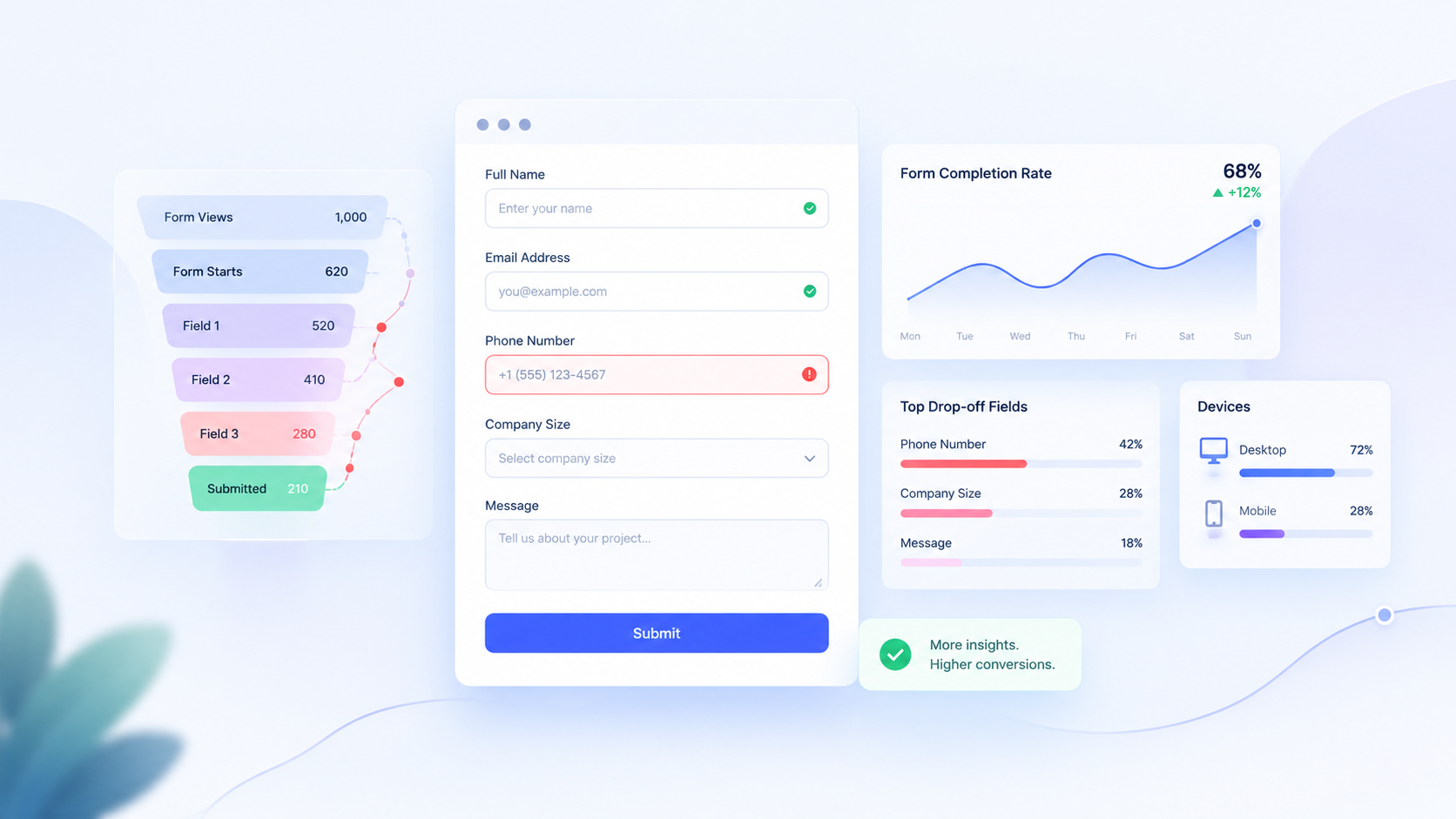
Field-level tracking helps identify where visitors stop progressing through a form.
Imagine a form with these fields:
Field | Visitors reaching field | Visitors progressing |
|---|---|---|
Name | 300 | 290 |
290 | 270 | |
Phone | 270 | 205 |
Company size | 205 | 190 |
In this illustrative example, the phone field has the largest decline in progression among the listed fields.
That doesn't automatically mean the phone field is the cause. Some visitors might leave for unrelated reasons. But it gives you a clear starting point for investigating whether the field is necessary, confusing, or difficult to complete.
Use consistent event definitions and distinguish field progression from confirmed abandonment whenever possible.
5. Validation Error Rate
Validation errors reveal where visitors encounter problems while entering information.
Track how often validation fails, which fields generate errors, and whether visitors successfully recover.
For example, repeated errors on a phone field might indicate overly strict formatting rules. Frequent email validation failures might reveal unclear instructions or an implementation issue.
A useful error report should help you distinguish between invalid input, confusing requirements, and technical failures.
6. Time to Complete
Time to completion measures how long it takes visitors to finish a form.
A longer completion time might indicate unnecessary fields, confusing questions, or difficulty using the interface. However, some forms naturally require more thought, so a longer duration isn't automatically a problem.
Compare similar forms, examine unusually long completion times, and interpret the results alongside field-level behavior and error data.
7. Submission Success Rate
A visitor clicking Submit doesn't necessarily mean the submission succeeded.
Track submission attempts separately from successful submissions confirmed by your application or backend.
This distinction helps identify problems such as failed API requests, integration errors, and forms that appear to submit but never deliver the data.
For lead-generation forms, this metric can be particularly important because a failed submission may represent a lost business opportunity.
How to Identify the Exact Point Where Visitors Drop Off
Once you've established your baseline metrics, use a structured process to investigate underperforming forms.
Step 1: Identify Your Highest-Impact Forms
Start with forms that have meaningful traffic and business value.
Examples include:
Demo request forms.
Contact and sales inquiry forms.
Signup and registration forms.
Quote request forms.
Checkout and payment forms.
Prioritize using traffic volume, abandonment, and the potential value of a successful conversion. A frequently abandoned form isn't necessarily your highest priority if very few visitors use it.
Step 2: Establish a Baseline
Record form views, starts, successful submissions, completion rates, and relevant errors over a defined period.
Segment the data where useful, such as by device, landing page, or traffic source.
Avoid making major changes before you understand the current performance. Otherwise, you won't have a reliable comparison for judging whether an improvement worked.
Step 3: Examine Field-Level Behavior
If your implementation supports field-level tracking, identify where progression declines most sharply.
Look for patterns such as:
A phone number field with unusually high abandonment.
A dropdown that generates repeated corrections.
A required question that causes visitors to stop.
A final step where users reach Submit but rarely succeed.
Field-level metrics should guide your investigation, not replace it. Confirm the likely cause through testing, error logs, usability feedback, or privacy-conscious session analysis where appropriate.
Step 4: Compare Mobile and Desktop
Break down form performance by device category.
If desktop users complete a form more frequently than mobile users, inspect the mobile experience for layout problems, difficult input controls, keyboard mismatches, and slow loading.
Also consider whether the traffic sources differ. A mobile audience arriving from one campaign might behave differently from a desktop audience arriving from another.
Step 5: Check the Entire Submission Flow
Follow the form from initial interaction through successful data processing.
Verify that:
Required fields have appropriate validation.
Error messages are visible and understandable.
Submission buttons respond correctly.
Loading indicators prevent confusing repeated clicks.
Network failures produce helpful recovery messages.
Successful submissions are recorded accurately.
CRM, email, and other integrations receive the expected data.
This helps distinguish user-experience problems from issues in the underlying application.
Step 6: Make One Focused Improvement
Once you have a reasonable hypothesis, make a targeted change.
For example, if a phone number field appears unnecessary for an initial demo request, test making it optional. If a date field generates repeated errors, clarify its expected format.
Avoid changing the entire form at once. Focused experiments make it easier to understand which change influenced the result.
Step 7: Measure the Result
Compare performance before and after the change using consistent event definitions and comparable traffic.
When traffic allows, use an A/B test with an appropriate sample size. Otherwise, run a carefully monitored before-and-after comparison and account for changes in traffic, campaigns, and seasonality.
Measure successful submissions, not just button clicks. Also check lead quality to ensure that increasing completion rates hasn't reduced the usefulness of the information collected.
Practical Ways to Improve Form Completion Rates
Once you've identified the main sources of friction, apply improvements that match the evidence.
Reduce unnecessary fields. Keep the initial form focused on the information required for the next step.
Use clear field labels. Explain exactly what visitors should enter, including format requirements where necessary.
Improve error recovery. Preserve valid entries, identify the field with a problem, and explain how to correct it.
Use suitable input types. Provide the right keyboard on mobile, appropriate autocomplete attributes, and accessible controls.
Build trust. Explain how submitted information will be used, provide relevant privacy information, and avoid requesting sensitive details without a clear reason.
Test multi-step forms when appropriate. Breaking a long form into smaller steps may make it easier to navigate, but it isn't guaranteed to improve completion. Measure the results and ensure visitors understand their progress.
Improve the final step. Use a clear submit button, communicate loading and success states, and explain what happens after submission.
Monitor form integrations. Confirm that successful submissions reach your CRM or other destination and that failures can be detected and resolved.
The most effective improvement depends on the problem your data reveals. Removing fields won't fix a broken API, and rewriting labels won't solve an unresponsive mobile layout.
Form Analytics and Privacy: What Should You Track?
Form analytics can reveal valuable behavioral patterns, but it must be implemented responsibly.
Forms often contain personal or sensitive information. Collecting unnecessary input values can create privacy and security risks without improving your analysis.
A privacy-conscious implementation should follow several principles:
Track interaction events and field identifiers rather than collecting entered values unless there is a clearly justified and lawful need.
Never capture passwords, payment details, authentication tokens, or other sensitive input values in analytics or session recordings.
Mask or exclude sensitive fields from recordings and diagnostic tools.
Limit access to analytics data and define appropriate retention periods.
Provide required privacy disclosures and obtain consent where applicable.
Respect applicable privacy laws, user preferences, and tracking restrictions.
You can often answer important questions about form performance without recording the actual information visitors enter. For example, you can measure whether a field was focused, whether validation failed, and whether a submission succeeded without storing the field's contents.
Privacy should be part of your analytics design from the beginning, not something added after tracking is implemented.
How Quantalog Can Help You Improve Website Conversions
Understanding form performance is one part of building a better website experience. You also need to understand where visitors come from, which pages attract them, and how effectively your website turns that attention into meaningful outcomes.
Quantalog brings website-focused workflows together, including SEO analysis, performance insights, analytics-related capabilities, and lead management tools.
By connecting insights from these areas, teams can build a more complete picture of their website performance.
For example, you can investigate whether a landing page attracts relevant visitors, review its performance, identify where the conversion process needs attention, and assess whether the resulting leads are useful to your business.
The specific form-level metrics available depend on your tracking implementation. If field-level analytics isn't already configured, you may need to instrument your forms or use a compatible form analytics solution before you can identify individual field drop-offs.
Explore Quantalog at https://quantalog.daorbit.in/ to learn more about its website and business productivity capabilities.
Frequently Asked Questions
What is form analytics?
Form analytics measures how visitors interact with online forms, including starts, successful submissions, field-level progression, validation errors, and abandonment. It helps teams identify friction and improve the user experience.
How do you calculate form abandonment rate?
Divide the number of form starters who did not successfully submit by the total number of form starters, then multiply by 100. Use a consistent measurement window and define what counts as a start and a successful submission.
Why do users abandon forms before submitting?
Common causes include excessive fields, unclear labels, privacy concerns, confusing validation messages, poor mobile usability, and technical submission failures. Analytics helps narrow down which issues deserve investigation.
Can Google Analytics track form abandonment?
Google Analytics 4 can measure form-related interactions through suitable events and custom instrumentation. However, identifying abandonment at an individual field level generally requires additional tracking or a specialized solution. Verify your event definitions and avoid sending personal information in analytics events.
What is the difference between form analytics and website analytics?
Website analytics measures broader behavior such as traffic, acquisition, engagement, and conversions. Form analytics focuses on the interactions that occur within forms, helping explain where users encounter difficulty before submission.
How can I improve form completion rates?
Start by establishing a baseline, finding where visitors stop progressing, investigating the underlying cause, and testing one focused improvement. Monitor successful submissions and lead quality to verify that the change creates a meaningful improvement.
Is form analytics safe for user privacy?
It can be implemented in a privacy-conscious way by tracking interaction events instead of entered values, masking sensitive fields, limiting data collection, and respecting applicable consent and privacy requirements.
Final Thoughts
A form can look polished and still create friction that prevents visitors from completing it.
The key is to stop treating every abandoned form as a design problem and start investigating what actually happens between the first interaction and successful submission.
Measure form starts and completions. Identify where progression declines. Investigate errors and device differences. Make focused improvements, and verify the results.
Better form conversion starts with understanding user behavior, not guessing what visitors want.
With a consistent measurement process, you can reduce unnecessary friction, improve the experience for your visitors, and make more informed decisions about the forms that support your business.