Quantalog Analytics: A Simpler, Privacy-First Way to Understand Your Website Traffic
Discover how Quantalog helps you track website visitors, traffic sources, conversions, SEO, and real-time analytics without cookies or complicated dashboards.

Quantalog
Website analytics should answer simple questions.
How many people visited my website?
Where did they come from?
Which pages did they view?
What are they doing right now?
Which campaigns are actually working?
But as websites have become more sophisticated, analytics platforms have also become more complicated.
Businesses often end up with dashboards filled with reports, dimensions, settings, filters, cookies, consent configurations, and data that can take time to process.
For many websites, that's more complexity than they actually need.
What if website analytics could simply tell you what is happening on your website — in real time, with useful traffic insights, without requiring a complicated setup?
That's the idea behind Quantalog Analytics.
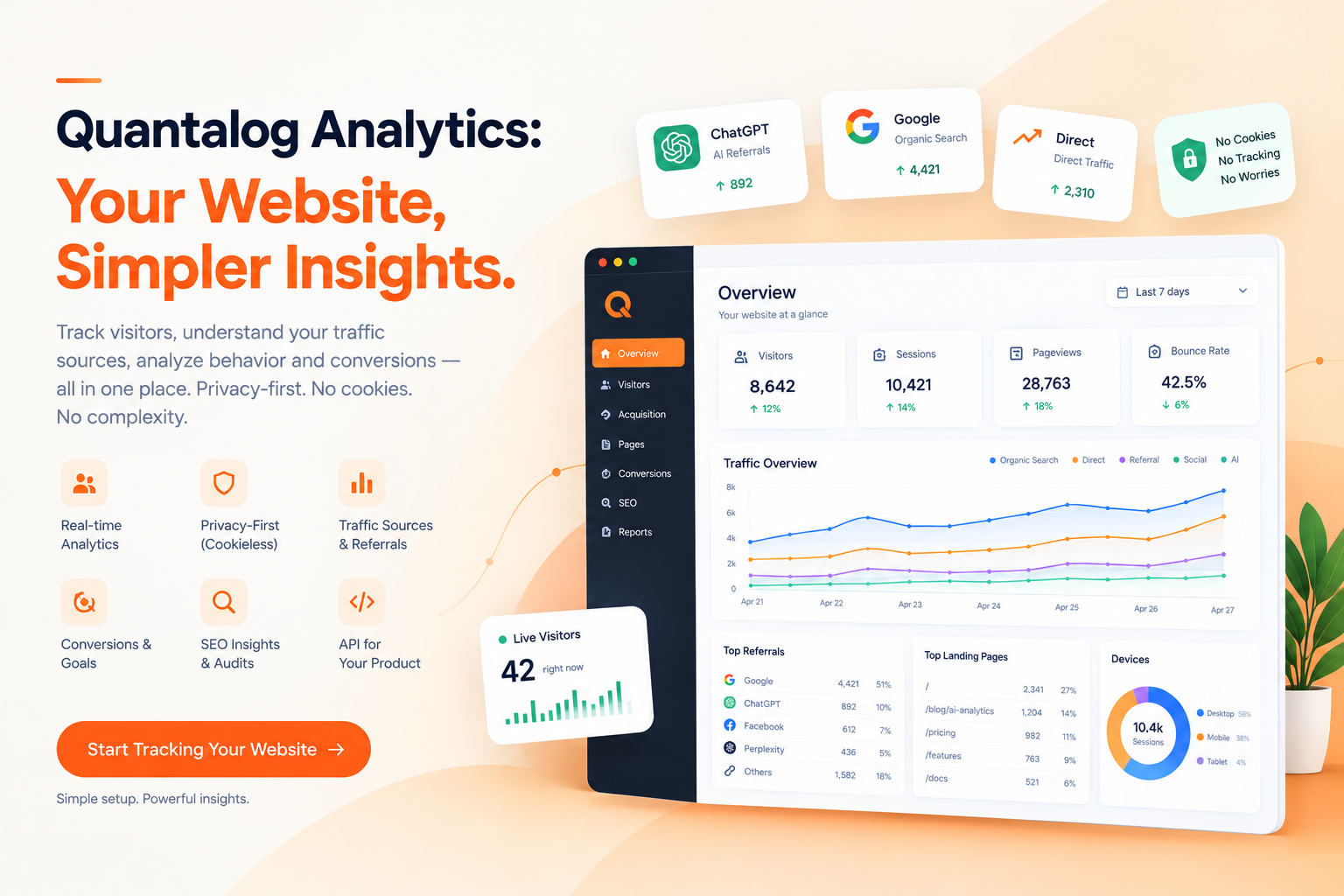
Quantalog is a privacy-first website analytics platform built around real-time traffic monitoring, cookieless tracking, conversion measurement, SEO insights, reporting, and an API that can be embedded into other products.
This article explains what Quantalog is, how it works, what you can track, and why a simpler approach to analytics can make sense for modern websites.
What Is Quantalog Analytics?
Quantalog is a website analytics platform designed to help businesses understand their website traffic without relying on traditional cookie-based tracking.
At its core, Quantalog gives you a real-time view of what is happening on your website.
You can monitor metrics such as:
Visitors
Sessions
Pageviews
Bounce rate
Average session duration
Traffic sources
Landing pages
Countries
Devices
Browsers
UTM campaigns
Custom events
Goals and conversions
The goal isn't to overwhelm you with hundreds of reports.
The goal is to make the important information easy to find.
Why Website Analytics Still Matters
A website can look great and still perform poorly.
You might have:
A beautiful landing page
Great branding
Excellent content
A fast website
A strong SEO strategy
But without analytics, you don't know what visitors are actually doing.
For example, imagine you receive 10,000 visitors this month.
That number sounds useful.
But it doesn't answer the important questions.
Where did those visitors come from?
Maybe:
Google → 4,000
Direct → 2,500
Social → 1,500
AI referrals → 800
Other referrals → 1,200
Now you have something actionable.
You can investigate which sources bring the most valuable visitors.
That's the real purpose of analytics:
Turning website activity into information you can act on.
Real-Time Analytics Instead of Waiting for Reports
One of the biggest advantages of real-time analytics is simple:
You can see what's happening now.
If you publish a new blog post, launch a product, send an email campaign, or share a post on social media, you don't necessarily want to wait until the next reporting cycle to understand the initial response.
With Quantalog, visitor and pageview activity is designed to appear in the dashboard in real time. The product currently describes first data arriving in roughly three seconds after installation.
Imagine launching a new page at 10:00 AM.
At 10:05 AM, you can start asking:
Are people visiting?
Which pages are they entering through?
Where are they coming from?
Are they exploring other pages?
Are they converting?
Real-time analytics turns the dashboard into a monitoring tool rather than just a historical report.
Privacy-First Analytics
Privacy has become an important consideration for modern websites.
Traditional analytics implementations can involve cookies, persistent identifiers, consent banners, and additional configuration.
Quantalog takes a different approach.
The tracker is designed to work without setting cookies or storing persistent browser identifiers. Quantalog describes its visitor identification as a rotating daily hash derived from information such as IP address and user agent, with raw IP addresses not persisted.
This means the product can focus on understanding website traffic without building a cross-site advertising profile of visitors.
Of course, privacy compliance is ultimately dependent on how a business configures its website, what information it collects, and which laws apply to it.
But the underlying principle is straightforward:
Collect the analytics information you actually need without unnecessarily tracking people.
No Cookie Banner Just for Analytics
One common frustration with analytics is the consent experience.
A visitor arrives at a website.
Before they can even read the page, they may see:
"We use cookies."
Then:
Accept all
Reject all
Manage preferences
For websites that only need basic traffic analytics, this can feel unnecessarily complicated.
Quantalog's analytics tracker doesn't set cookies, and the product is designed around a cookieless approach.
That makes the analytics setup simpler for websites that want privacy-focused traffic measurement.
It also means there isn't a cookie banner being introduced solely because of the analytics tracker.
However, websites may still need consent mechanisms for other technologies they use, such as advertising, marketing, personalization, or third-party services.
A Lightweight Analytics Tracker
Analytics shouldn't slow down the website you're trying to measure.
Quantalog's tracker is designed to be lightweight, with the current product page listing it at under 1 KB and loaded asynchronously.
The installation is intentionally simple:
Create a site → Add one script → Start tracking
You don't need to install a large SDK or modify your application's architecture.
The tracker also handles client-side route changes, making it suitable for modern single-page applications.
Works With Modern Websites
Websites aren't built with one technology anymore.
You might have a:
React application
Next.js website
Vue application
Svelte app
Angular project
Astro website
WordPress site
Shopify store
Webflow website
Plain HTML website
Quantalog currently documents support across these and other frameworks and platforms.
The basic principle remains the same:
Add the tracker and start collecting analytics.
For React and Next.js applications, the tracker can detect client-side navigation so pageviews don't require additional tracking code for every route.
What Can You Track With Quantalog?
Quantalog isn't limited to a single visitor count.
It provides multiple dimensions for understanding website activity.
Visitors
See how many visitors are reaching your website.
This gives you a high-level view of your audience.
Pageviews
Understand how many pages are being viewed.
Pageviews can help identify which areas of your website receive the most attention.
Sessions
Sessions provide additional context around visitor activity.
Instead of looking at isolated pageviews, you can understand activity within a visit.
Bounce Rate
Bounce rate can help you identify pages where visitors leave without continuing their journey.
A high bounce rate doesn't automatically mean a page is bad.
The right interpretation depends on the purpose of the page.
A documentation page, for example, might successfully answer a question in one visit.
That's why bounce rate should be analyzed alongside other metrics.
Understand Where Your Visitors Come From
Traffic source data is one of the most useful parts of website analytics.
You can investigate sources such as:
Search engines
Direct traffic
Social platforms
Referral websites
Campaigns
AI platforms where identifiable
For example:
Google → Organic search
LinkedIn → Social
Partner website → Referral
Newsletter → UTM campaign
This helps you understand which channels are actually sending visitors to your website.
Track UTM Campaigns
Marketing campaigns become much easier to measure when links contain UTM parameters.
For example:
?utm_source=linkedin
&utm_medium=social
&utm_campaign=product_launch
Instead of simply seeing traffic from LinkedIn, you can understand which specific campaign generated the visit.
This is useful for:
Product launches
Social campaigns
Email campaigns
Paid campaigns
Influencer campaigns
Partnership campaigns
Content promotion
You can then connect:
Campaign → Visitors → Pages → Engagement → Conversion
Track Custom Events and Goals
Not every important action is a pageview.
A visitor might:
Click "Start Free"
Submit a form
Sign up
Upgrade a plan
Download a document
Click a pricing button
Complete a checkout
Start a product demo
These actions can be tracked as custom events.
Quantalog supports custom events and goals so businesses can measure specific actions and calculate conversion rates.
For example:
rta.track("signup", {
  plan: "pro"
});
Now a signup can become a measurable event rather than an invisible interaction.
From Traffic Analytics to Conversion Analytics
Traffic tells you what happened.
Conversions help explain whether that traffic mattered.
Imagine two marketing channels:
Channel A
1,000 visitors 20 signups
Channel B
400 visitors 35 signups
If you only look at visitors, Channel A looks bigger.
But if you're interested in signups, Channel B deserves investigation.
That's why good analytics shouldn't stop at:
"How many people came?"
It should help answer:
"What did they do?"
Built-In SEO Insights
Website analytics and SEO are often treated as completely separate tools.
But they influence each other.
You might discover that an article receives significant traffic but has a technical SEO problem.
Or a page might have strong traffic but poor Core Web Vitals.
Quantalog combines analytics with built-in SEO auditing.
Its SEO audits currently include checks around areas such as:
Lighthouse scores
Meta tags
Heading structure
Image alt text
Structured data
Broken links
Redirect chains
Core Web Vitals
The audits can also be retained over time so changes can be compared after fixes.
That creates a useful workflow:
Measure traffic → Identify important pages → Audit pages → Fix issues → Measure again
Analytics and SEO in One Workflow
Imagine you have a blog article receiving 5,000 visitors.
Your analytics tells you:
This page is important.
Your SEO audit tells you:
This page has missing metadata and structured-data issues.
You make improvements.
Then you monitor the page again.
Now your workflow becomes measurable.
Instead of saying:
"We improved our SEO."
you can start asking:
"Did the improvement change traffic, engagement, or conversions?"
That's a much more useful question.
Share Analytics With Clients
Agencies and freelancers often need to send analytics information to clients.
But asking every client to create an analytics account and learn a complicated dashboard isn't always ideal.
Quantalog provides shareable, read-only dashboards that can be opened through a link without requiring the recipient to have an account.
This can be useful for:
Marketing agencies
Freelancers
Web developers
SaaS teams
Client reporting
Internal dashboards
You can decide which panels are visible instead of exposing the entire workspace.
Scheduled Reports
Some people don't want to open an analytics dashboard every morning.
They want the important information to come to them.
Quantalog's reporting functionality is designed around scheduled summaries, including email and WhatsApp delivery, so teams and clients can receive recurring updates without manually opening the dashboard.
This can turn analytics into a recurring business workflow:
Track → Analyze → Summarize → Deliver
Instead of:
Track → Forget → Remember three weeks later → Open dashboard
Analytics for Agencies and Multi-Site Businesses
Managing one website is straightforward.
Managing 20, 50, or 100 websites is different.
Agencies need to keep each client's analytics separated while still having a consistent workflow.
Quantalog supports workspaces and multiple sites, allowing properties to be organized while keeping site data scoped appropriately.
This makes the platform useful beyond individual website owners.
It can also support businesses building analytics into their own products.
The Quantalog Platform API
One of the more advanced parts of Quantalog is its Platform API.
Imagine you're building:
A website builder
A hosting platform
An agency dashboard
A SaaS platform
A client portal
A website management platform
Your customers each have their own websites.
Instead of asking every customer to create their own analytics setup, you can integrate analytics directly into your application.
Quantalog's Platform API is designed for this use case, allowing applications to create projects for end users, register sites, and retrieve analytics data through the API.
This changes Quantalog from simply being an analytics dashboard into something that can become part of another product.
Why Simplicity Matters
More analytics doesn't necessarily mean better analytics.
If a dashboard has hundreds of reports but your team only needs:
Visitors
Traffic sources
Top pages
Conversions
Countries
Devices
then all that extra complexity can become a distraction.
Quantalog takes a different approach.
The idea is:
Show the information that helps you make decisions.
Not:
Show every possible number because we can.
Quantalog vs Traditional Analytics
The difference isn't simply about having more features.
It's about the philosophy behind the analytics platform.
Traditional analytics platforms can provide extremely detailed reporting, advertising integrations, audiences, attribution models, and advanced configurations.
That's useful for certain organizations.
But many startups, developers, creators, agencies, and small businesses don't need all of that.
They need answers.
Who is visiting?
Where are they coming from?
What are they reading?
What are they doing?
Is the website improving?
That's the problem Quantalog is designed to solve.
Who Is Quantalog For?
Quantalog can be useful for several types of users.
SaaS Companies
Understand how visitors discover your product and which pages drive signups.
Startups
Get real-time visibility without building a complex analytics infrastructure.
Developers
Add analytics to React, Next.js, Vue, and other applications with a lightweight tracker.
Agencies
Manage multiple client websites and share read-only dashboards.
Marketers
Measure campaigns, referrals, landing pages, and conversions.
Website Owners
Understand traffic without needing to become an analytics expert.
Platforms and App Builders
Use the Platform API to embed analytics directly into your own product.
Getting Started With Quantalog
Getting started is intentionally simple.
Step 1: Create a Site
Add your website to your Quantalog workspace.
Step 2: Add the Tracker
Add the async tracking script to your website.
Step 3: Open Your Dashboard
Once visitors start arriving, the data begins appearing in the dashboard.
Quantalog's current setup documentation describes the process as three steps and says the first pageview can arrive within roughly three seconds.
There is no large SDK to install.
There is no complicated build process.
You add the tracker and start measuring.
What Makes Quantalog Different?
Quantalog isn't trying to win by giving you the largest analytics dashboard.
Its approach is different.
Privacy-first
Analytics designed without cookies and persistent cross-site tracking.
Real-time
See website activity as it happens.
Lightweight
A small tracker designed to minimize impact on the website.
Simple
Focus on the metrics most teams actually use.
SEO included
Analyze traffic and audit website health from the same platform.
Shareable
Give clients or teammates access to read-only dashboards.
API-first
Build analytics directly into your own product.
Automation
Use scheduled reports and other automation features to turn analytics into an ongoing workflow.
Website Analytics Is Becoming More Than Traffic
The future of analytics isn't simply about counting visitors.
Modern websites need to connect multiple pieces:
Traffic
↓
Acquisition
↓
Content
↓
Engagement
↓
Conversions
↓
SEO
↓
Reporting
The more connected these pieces become, the easier it is to understand what is actually working.
That's the direction Quantalog is built around.
Start Tracking Your Website With Quantalog
You shouldn't need to become a data analyst just to understand your website.
You shouldn't need a complicated analytics implementation just to know where your visitors came from.
And you shouldn't have to choose between useful analytics and a privacy-focused approach.
Quantalog brings website analytics, conversion tracking, SEO insights, reporting, and an embeddable analytics API into one platform.
If you want a simpler way to understand your website traffic, try Quantalog.
Start free. Add your website. See your traffic in real time.
Track less. Understand more.
[Start Tracking Your Website with Quantalog →]
Frequently Asked Questions
What is Quantalog Analytics?
Quantalog is a privacy-first website analytics platform for tracking visitors, sessions, pageviews, traffic sources, conversions, and other website metrics in real time.
Is Quantalog a Google Analytics alternative?
Yes. Quantalog is positioned as a simpler, privacy-first alternative for businesses that want essential website analytics without the complexity of a traditional analytics suite.
Does Quantalog use cookies?
Quantalog's analytics tracker is designed to operate without setting cookies. Its current implementation uses a rotating daily visitor hash rather than a persistent browser identifier.
Can I track a React or Next.js website?
Yes. Quantalog supports modern frameworks including React and Next.js. Client-side route changes can be tracked without adding separate tracking code to every page.
Can I track conversions?
Yes. Quantalog supports custom events and goals so you can measure actions such as signups, button clicks, and other important events.
Can I share analytics with my clients?
Yes. Quantalog provides read-only shareable dashboards that clients can open through a link without creating an account.
Does Quantalog include SEO analytics?
Quantalog includes Lighthouse-backed SEO audits covering areas such as Core Web Vitals, metadata, structured data, broken links, and other website issues.
Does Quantalog provide an API?
Yes. The Platform API allows businesses and platforms to integrate Quantalog analytics into their own products and customer dashboards.
Who should use Quantalog?
Quantalog can be useful for startups, SaaS companies, developers, agencies, marketers, website owners, and platforms that need simple, privacy-focused website analytics.
How do I start?
Create a Quantalog account, add your website, install the lightweight tracking script, and open your dashboard to start monitoring your website traffic.