Search Clicks vs Website Visitors: Why These Numbers Never Match
Google Search Console clicks and website analytics visitors often show different numbers. Learn why they differ, what each metric actually measures, and how to use both to understand your website's search performance.
Quantalog
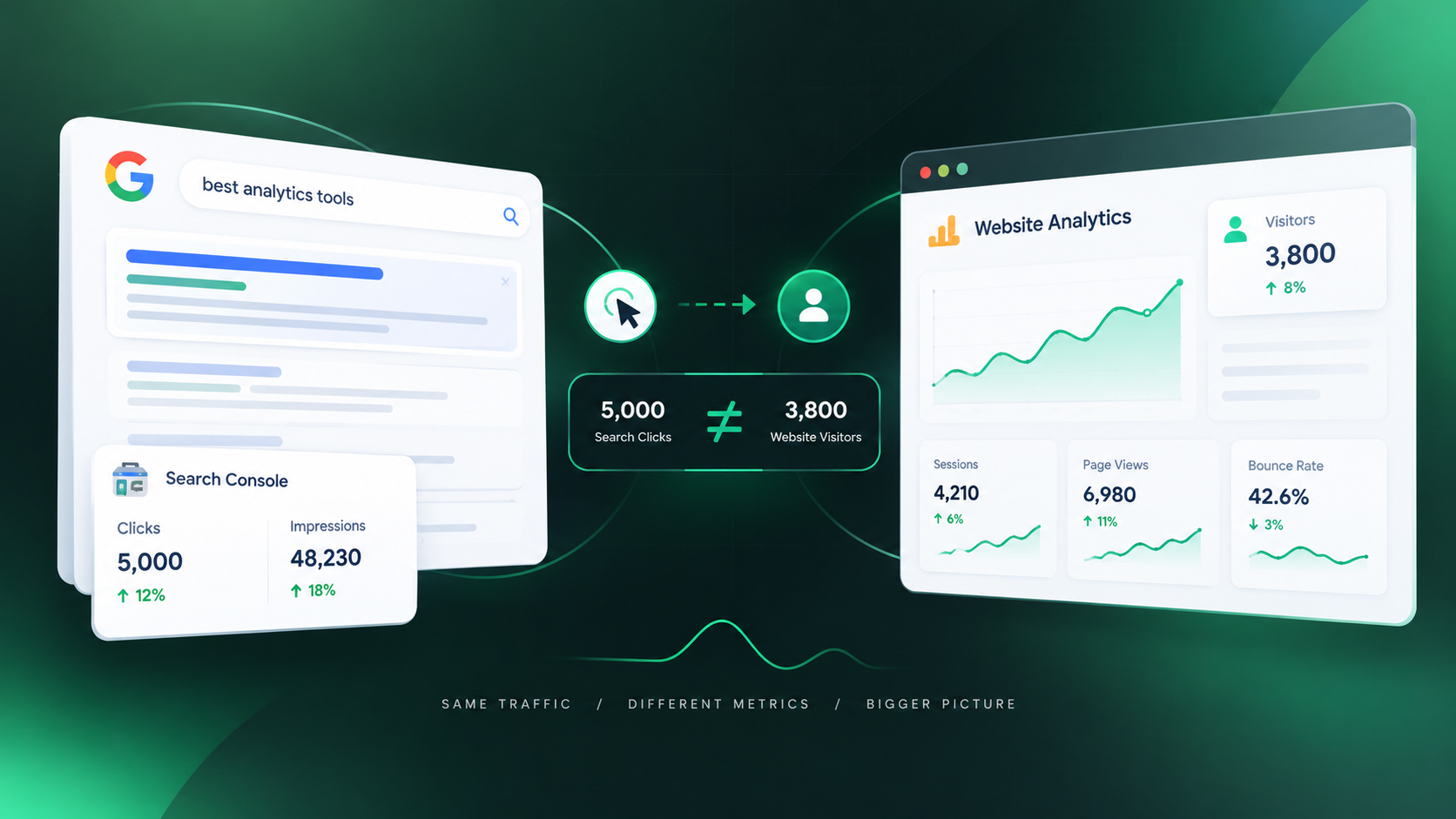
You open Google Search Console and see 5,000 clicks.
Then you open your website analytics and see only 3,800 visitors.
So which number is correct?
Usually, both are correct.
The confusion comes from assuming that a Google Search click and a website visit are the same thing.
They aren't.
Google Search Console and website analytics measure different parts of the user journey. One focuses on what happens in Google Search, while the other focuses on what happens after someone reaches your website.
Understanding that difference is important if you want to accurately measure organic search performance.
Google Search Clicks and Website Visitors Measure Different Things
The simplest way to understand the difference is to look at where each measurement happens.
Google Search Console measures activity in Google Search.
Website analytics measures activity on your website.
The journey looks something like this:
Google Search → Search Result → Click → Website → Analytics
Google Search Console primarily measures what happens before and around the click.
Your analytics platform measures what happens after the visitor reaches your website and is successfully tracked.
Because the measurement happens at different points, the numbers don't have to match.
What Is a Search Click?
A click in Google Search Console represents a user clicking your website's result from Google Search.
For example, someone searches for:
"best website analytics tools"
They see your page in the results and click it.
Google Search Console can record that interaction as a search click.
Search Console can then help you understand things such as:
Which queries generated clicks
Which pages received clicks
How many impressions those pages received
Average search position
Click-through rate
Countries where clicks originated
Devices used for searches
This data is extremely useful for understanding your search visibility.
But it doesn't tell you everything that happened once the user reached your website.
What Is a Website Visitor?
Website analytics works differently.
A visitor generally needs to reach your website and trigger the analytics tracking implemented on your site.
Depending on the analytics platform and configuration, the system can then record information about the visit, such as:
Sessions
Users
Page views
Landing pages
Engagement
Traffic sources
Devices
Conversions
The exact definitions vary between analytics platforms.
So a person clicking your result in Google doesn't automatically guarantee that your analytics platform will record that person as a visitor.
Why Don't the Numbers Match?
There are several reasons.
1. Search Clicks and Analytics Sessions Are Different Metrics
This is the biggest reason.
A Search Console click is not equivalent to an analytics session.
Consider this example:
A person searches Google and clicks your result.
Google records a click.
The page starts loading, but the visitor immediately leaves before your analytics tracking code loads or sends its event.
You could therefore have:
1 Search Click
but:
0 recorded sessions
The two systems observed different parts of the journey.
2. Analytics Tracking May Not Fire
Your analytics system needs its tracking mechanism to work correctly.
If the tracking script doesn't load or the analytics request isn't successfully sent, the visit may not appear in your analytics reports.
Possible causes include:
JavaScript errors
Tracking script failures
Incorrect implementation
Consent restrictions
Browser privacy protections
Network blocking
Ad or tracking blockers
Tag configuration problems
Google can still record the search interaction even when your website analytics doesn't successfully record the subsequent visit.
3. Consent Can Affect Analytics Data
Modern websites often ask visitors for consent before activating certain analytics technologies.
Imagine this journey:
Google Search → Click → Website → Consent prompt → Visitor declines analytics
Google Search Console may record the click.
Your analytics platform may not record the visitor in the same way.
This can create a noticeable difference between search clicks and analytics traffic.
The exact behavior depends on how your consent management and analytics implementation are configured.
4. Ad Blockers and Privacy Tools Can Change What Analytics Sees
Some visitors use browser extensions, privacy tools, or network-level blocking.
These tools can prevent analytics requests from reaching your analytics provider.
The person still visited your website.
They still consumed your content.
But your analytics platform may not have recorded the visit.
This is one reason analytics should not always be treated as a perfect count of every human interaction with a website.
5. The User May Leave Before the Page Fully Loads
A user can click a search result and change their mind almost immediately.
For example:
Search result → Click → Page begins loading → User closes tab
Google may already have recorded the click.
Your analytics tracking code may not have had enough time to send the required request.
This can contribute to differences between Search Console and analytics data.
6. Different Date and Time Settings Can Create Differences
Always check the reporting configuration before comparing numbers.
Your Search Console report and analytics report may use different:
Date ranges
Time zones
Filters
Properties
Search types
Data processing rules
For example, comparing Search Console data for September 1–30 with an analytics report using a different timezone or date range can produce misleading results.
Before comparing two metrics, make sure you're actually comparing the same period.
7. Search Console and Analytics Process Data Differently
The platforms don't collect and process data in exactly the same way.
Search Console is designed around Google's search ecosystem.
Analytics is designed around activity occurring on your website.
They therefore have different:
Collection methods
Processing rules
Attribution models
Privacy mechanisms
Data definitions
Reporting systems
Even if both systems are configured correctly, you shouldn't expect their numbers to match perfectly.
A Simple Example
Imagine 10,000 people see your website in Google Search.
Of those:
10,000 impressions
↓
600 search clicks
↓
540 successfully recorded website sessions
That doesn't necessarily mean that the remaining 60 clicks were fake or that something is broken.
Some visitors may have:
Left before analytics loaded
Blocked tracking
Declined analytics consent
Encountered a tracking issue
Been affected by other measurement limitations
The important point is that 600 clicks and 540 sessions are measuring different events.
So Which Number Should You Trust?
Instead of asking:
"Which number is correct?"
Ask:
"What question am I trying to answer?"
If you want to understand Google Search performance, Search Console data is the relevant source.
You can investigate:
Search impressions
Search clicks
CTR
Average position
Search queries
Landing pages
If you want to understand what happens on your website, your analytics platform is more relevant.
You can investigate:
Sessions
Users
Engagement
Landing pages
Conversions
On-site behavior
Neither metric replaces the other.
They answer different questions.
Don't Use Search Clicks Alone to Measure SEO Success
Imagine your Search Console report looks like this:
Clicks: +35%
That sounds positive.
But what happened after those clicks?
Maybe:
Website sessions: +28%
But then:
Engaged sessions: +5%
And:
Conversions: -3%
Now the story is different.
Your search visibility may have improved, while the business outcome hasn't improved at the same rate.
That's why SEO reporting shouldn't stop at clicks.
You want to understand the complete journey:
Impressions → Clicks → Visits → Engagement → Conversions
Each stage tells you something different.
Search Console Can Tell You What Analytics Can't
One of the biggest advantages of Search Console is that it shows you the search context behind your traffic.
Your website analytics might tell you that a visitor arrived through organic search.
Search Console can help answer:
Which query caused that visibility?
For example, one page might receive traffic from dozens or hundreds of different search queries.
You can discover:
Queries generating impressions but few clicks
Queries where your page ranks near the first page
Pages gaining search visibility
Pages losing visibility
Search terms you didn't intentionally target
Differences between mobile and desktop search performance
This information can reveal SEO opportunities that aren't obvious from website traffic alone.
Analytics Can Tell You What Happened After the Click
Search Console tells you about the search journey.
Analytics can help you understand what happened after the visitor arrived.
For example:
A search query generates 1,000 clicks.
But those visitors:
Leave immediately
Visit only one page
Never interact with your CTA
Don't sign up
Don't purchase
That changes how you should evaluate the traffic.
A large number of search clicks isn't automatically valuable if the visitors aren't finding what they need.
The Real Value Comes From Connecting Both
The most useful analysis happens when you stop treating Search Console and analytics as completely separate reports.
Imagine you find a page with:
50,000 impressions
2,500 clicks
5% CTR
Average position: 7
Now look at what happens after those visitors arrive.
You might discover:
2,300 sessions
High engagement
Strong conversion rate
That's a page worth understanding and potentially expanding.
Now consider another page:
70,000 impressions
1,000 clicks
1.4% CTR
Average position: 6
And after those clicks:
Low engagement
Few conversions
That's a very different situation.
The first page may be attracting highly relevant traffic.
The second may have a mismatch between search intent, search-result messaging, and what visitors find after clicking.
You can't see the complete story from either dataset alone.
A Better Way to Diagnose Organic Traffic
When analyzing an organic page, work through these questions:
1. Is Google showing the page?
Check impressions.
If impressions are extremely low, investigate search demand, indexing, relevance, and rankings.
2. Is the page being clicked?
Check CTR and clicks.
High impressions with low CTR can indicate an opportunity to improve the search result's relevance and appeal.
3. Are visitors reaching the website?
Compare search clicks with your analytics data.
A difference doesn't automatically mean something is broken.
4. Are visitors engaging?
Look at your analytics metrics.
Determine whether people are actually finding value after arriving.
5. Are visitors converting?
Traffic is only one part of the business equation.
Look at signups, leads, purchases, or whatever outcome matters to your website.
The SEO Funnel Is Bigger Than Rankings
A modern SEO report should not stop at:
"We rank at position 5."
A more useful view is:
Visibility
→ How often are we appearing?
Rankings
→ Where are we appearing?
CTR
→ Are people choosing our result?
Traffic
→ Are visitors reaching the website?
Engagement
→ Are they finding what they need?
Conversion
→ Does that traffic create business value?
This is why search performance and website analytics work best together.
Final Takeaway
Don't worry if your Google Search clicks and website visitors don't match exactly.
They're measuring different stages of the journey.
Search Console helps you understand how people discover your website through Google.
Website analytics helps you understand what happens after they arrive.
The difference between the two can come from tracking limitations, consent, privacy tools, timing, processing differences, and the fact that clicks and sessions simply aren't the same metric.
Instead of trying to force the numbers to match, use them together.
Look for the bigger story:
Are people finding your pages?
Are they clicking them?
Are they reaching your website?
Are they engaging?
And are those visitors creating meaningful outcomes?
That's where search visibility becomes much more useful than a single traffic number.
When Search Console and website analytics are viewed together, you can move from simply reporting traffic to understanding why your organic performance is changing and where the next opportunity is.
Try Quantalog on your own site
One script tag, no cookies, live numbers in about three seconds. Free forever on the Hobby plan.
Start freeKeep reading
From Google Impression to Customer: Measuring the Full Search Journey
A Google impression is only the beginning of the customer journey. Learn how to connect search impressions, clicks, website visits, engagement, and conversions to understand the real business value of organic search.
Your Pages Are Indexed but Still Getting No Traffic — Here's Why
Your page is indexed by Google but still gets little or no organic traffic? Learn why indexing doesn't guarantee visibility, rankings, clicks, or visitors—and how to identify what is holding your pages back.